Behind Cloudflare? You're logging the wrong IP.
You set up IP logging, forgot about it, then an account gets hacked and every row says Cloudflare. Here's how to log the real visitor IP, safely.
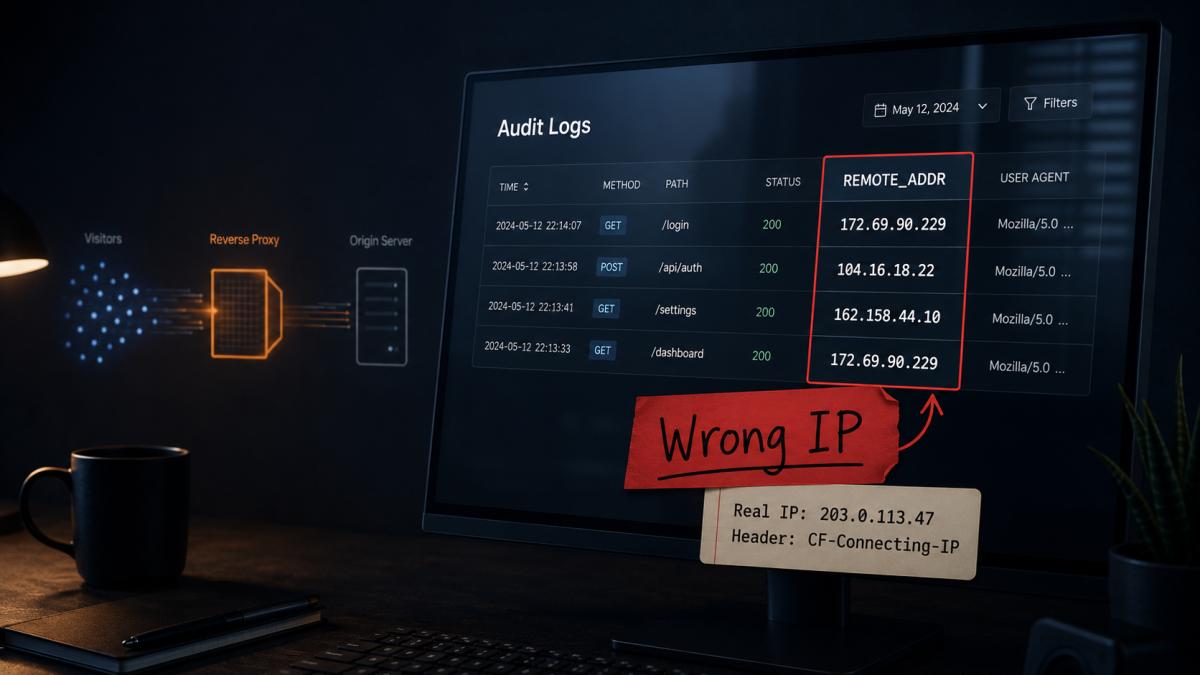
You set up IP logging ages ago and forgot about it. Audit trail, last-login IP, a bit of rate limiting. Then an account gets hacked, you open the log to see where from, and every row says Cloudflare. Thousands of them, not one the actual visitor.
The logging never broke. It’s been recording the wrong thing since the day you turned the proxy on.
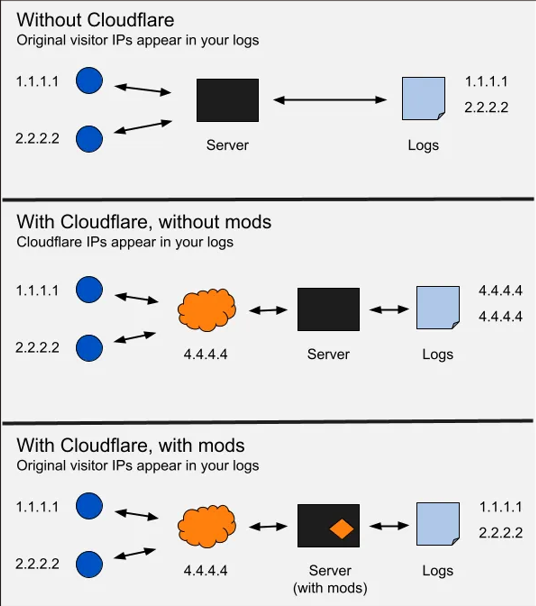
Here’s why. Cloudflare is a reverse proxy, so every request reaches your server from Cloudflare’s edge. Your REMOTE_ADDR is a Cloudflare IP, and that’s correct, it’s where the packet came from. The real visitor IP is sitting in a header called CF-Connecting-IP. You just have to read it, and trust it only when it’s safe to.
Check if it’s you
Compare the IPs you’re logging against Cloudflare’s published ranges (v4, v6, or JSON). If they all sit inside blocks like 104.16.0.0/13 or 162.158.0.0/15, you’re logging Cloudflare.
The fix (and the one trap)
The real visitor IP lives in CF-Connecting-IP. But the underlying concern isn’t “read this header”, it’s which proxy you trust. Trust Cloudflare as the proxy in front of you and your framework will pull the visitor IP out of the forwarded chain on its own, no header-reading required.
The trap is trusting forwarded headers from everywhere. Anyone can set CF-Connecting-IP or X-Forwarded-For. Trust them from arbitrary traffic and you’ve let visitors write any IP they like into your logs and walk past your rate limits. So trust them only from Cloudflare’s ranges, and make sure nothing reaches your origin except through Cloudflare (a firewall rule or a Tunnel). That second half matters as much as the first: if the origin is publicly reachable and you trust forwarded headers, the spoofing door is wide open.
Two ways to do it.
Caddy
Only let Cloudflare through, then rewrite X-Forwarded-For from CF-Connecting-IP. This is straight from Cloudflare’s docs:
https://example.com {
    # Only let Cloudflare's edge IPs past this point.
    @cloudflare {
        remote_ip 173.245.48.0/20 103.21.244.0/22 103.22.200.0/22 103.31.4.0/22 141.101.64.0/18 108.162.192.0/18 190.93.240.0/20 188.114.96.0/20 197.234.240.0/22 198.41.128.0/17 162.158.0.0/15 104.16.0.0/13 104.24.0.0/14 172.64.0.0/13 131.0.72.0/22 2400:cb00::/32 2606:4700::/32 2803:f800::/32 2405:b500::/32 2405:8100::/32 2a06:98c0::/29 2c0f:f248::/32
    }

    handle @cloudflare {
        reverse_proxy localhost:8080 {
            header_up X-Forwarded-For {http.request.header.CF-Connecting-IP}
        }
    }

    handle {
        respond "Access Denied" 403
    }
}
That IP list is a frozen snapshot. When Cloudflare adds a range and you haven’t updated it, visitors on that new edge start getting 403s, or (if you rely on the firewall) your spoofing protection slips. Keeping it auto-updated is its own post.
Laravel
If Cloudflare talks to your app directly, there’s no middleware to write. Trust Cloudflare’s ranges and Laravel does the rest, it pulls the real visitor IP out of the forwarded chain and honours X-Forwarded-Proto, so HTTPS detection keeps working too.
Keep the trusted ranges in a flat file, since they load before config() is ready:
<?php

declare(strict_types=1);

/*
|--------------------------------------------------------------------------
| Cloudflare proxy IP ranges
|--------------------------------------------------------------------------
|
| A flat list of the published Cloudflare edge IP ranges, trusted as proxies
| so the real visitor IP can be resolved from the X-Forwarded-For chain. This
| file is required directly from bootstrap/app.php (config() is not yet bound
| at that point), and is rewritten by the `cloudflare:refresh-ips` command,
| which logs (never throws) on failure so an upstream Cloudflare outage can
| never take the application down.
|
| Source: https://api.cloudflare.com/client/v4/ips
| Snapshot taken: 2026-06-08
|
*/

return [
    '173.245.48.0/20',
    '103.21.244.0/22',
    '103.22.200.0/22',
    '103.31.4.0/22',
    '141.101.64.0/18',
    '108.162.192.0/18',
    '190.93.240.0/20',
    '188.114.96.0/20',
    '197.234.240.0/22',
    '198.41.128.0/17',
    '162.158.0.0/15',
    '104.16.0.0/13',
    '104.24.0.0/14',
    '172.64.0.0/13',
    '131.0.72.0/22',
    '2400:cb00::/32',
    '2606:4700::/32',
    '2803:f800::/32',
    '2405:b500::/32',
    '2405:8100::/32',
    '2a06:98c0::/29',
    '2c0f:f248::/32',
];
Then trust it in bootstrap/app.php:
->withMiddleware(function (Middleware $middleware): void {
    $middleware->trustProxies(at: require __DIR__.'/../config/cloudflare-proxies.php');
});
That’s the whole fix. With Cloudflare trusted as a proxy, $request->ip() returns the visitor and $request->isSecure() reads the forwarded scheme, your logs, rate limits, and redirects all line up.
When another proxy sits in front
If there’s an nginx, Caddy, or load balancer between Cloudflare and Laravel, the chain changes. That extra hop may rewrite REMOTE_ADDR to itself, and now X-Forwarded-For no longer ends at a Cloudflare IP, so Laravel can’t recover the visitor from it. The fix is to put CF-Connecting-IP back onto the front of the chain before TrustProxies runs:
<?php

declare(strict_types=1);

namespace App\Http\Middleware;

use Closure;
use Illuminate\Http\Request;
use Symfony\Component\HttpFoundation\Response;

final class SetCloudflareClientIp
{
    /**
     * Prepend Cloudflare's real visitor IP (CF-Connecting-IP) onto the
     * X-Forwarded-For chain so TrustProxies can resolve the true client IP.
     * Prepend, never overwrite: clobbering the chain with only the client IP
     * makes the connecting address look untrusted, and Laravel drops
     * X-Forwarded-Proto with it, falling back to http.
     *
     * @param  Closure(Request): Response  $next
     */
    public function handle(Request $request, Closure $next): Response
    {
        $clientIp = $request->headers->get('CF-Connecting-IP');

        if (is_string($clientIp) && filter_var($clientIp, FILTER_VALIDATE_IP) !== false) {
            $forwardedFor = $request->headers->get('X-Forwarded-For');

            $request->headers->set(
                'X-Forwarded-For',
                $forwardedFor !== null && $forwardedFor !== ''
                    ? $clientIp.', '.$forwardedFor
                    : $clientIp,
            );
        }

        return $next($request);
    }
}->withMiddleware(function (Middleware $middleware): void {
$middleware->prepend(SetCloudflareClientIp::class);
$middleware->trustProxies(at: require __DIR__.'/../config/cloudflare-proxies.php');
});Prepend, don’t overwrite, and Laravel still needs to see a trusted proxy in front, or it drops HTTPS detection and falls back to http, breaking secure cookies and redirects.
Same snapshot problem as Caddy: that range file is frozen until something updates it. The cloudflare:refresh-ips command that keeps it current (and stays quiet when Cloudflare’s API is down) is its own post.
Verify it before you trust it
Don’t wire the new IP into rate limits or fraud rules until you’ve confirmed it’s actually resolving. The fastest way to catch a half-applied config is to log all three values next to each other during rollout:
Log::info('ip-check', [
    'client_ip' => $request->ip(),                              // what your app will use
    'edge_ip'   => $request->server->get('REMOTE_ADDR'),        // the proxy hop
    'xff'       => $request->headers->get('X-Forwarded-For'),   // the raw chain
]);
Before — client_ip and edge_ip are the same Cloudflare IP. The config hasn’t taken effect, and the real visitor is stranded in xff:
{
  "client_ip": "172.69.90.229",
  "edge_ip": "172.69.90.229",
  "xff": "203.0.113.47"
}
After — client_ip is the visitor, edge_ip is still Cloudflare (correct, that is the hop), and the chain reads visitor-first:
{
  "client_ip": "203.0.113.47",
  "edge_ip": "172.69.90.229",
  "xff": "203.0.113.47, 172.69.90.229"
}
When you see that second line, you’re done, and you can delete the log line. This is also the moment “we have auditing” turns into “the audit data is right”, you’ve now seen which one you have.
The point
“We have auditing” and “the audit data is right” aren’t the same claim, and you find out at the worst time. The moment you put anything in front of your app, the visitor’s IP moves into a header, and everything that uses it follows along: your logs, your rate limits, your fraud checks. Put the real IP back, and put it back safely.
Go check your logs.
References: Restoring original visitor IPs (Cloudflare), Cloudflare IP ranges, Cloudflare HTTP headers